New Lilmem: one line a day diary, 15 yrs running, private

Little Memory 2.0: Moving 15 years of memories off my servers

In April, I started inviting folks to test out Little Memory 2.0, a full re-write of the one-sentence-a-day journal I launched in 2011. I had most of the bones of the new app ready at that point, but, as most folks who develop software professionally know, the last 20% can often be the most tricky, difficult, and filled with unforeseen bugs.

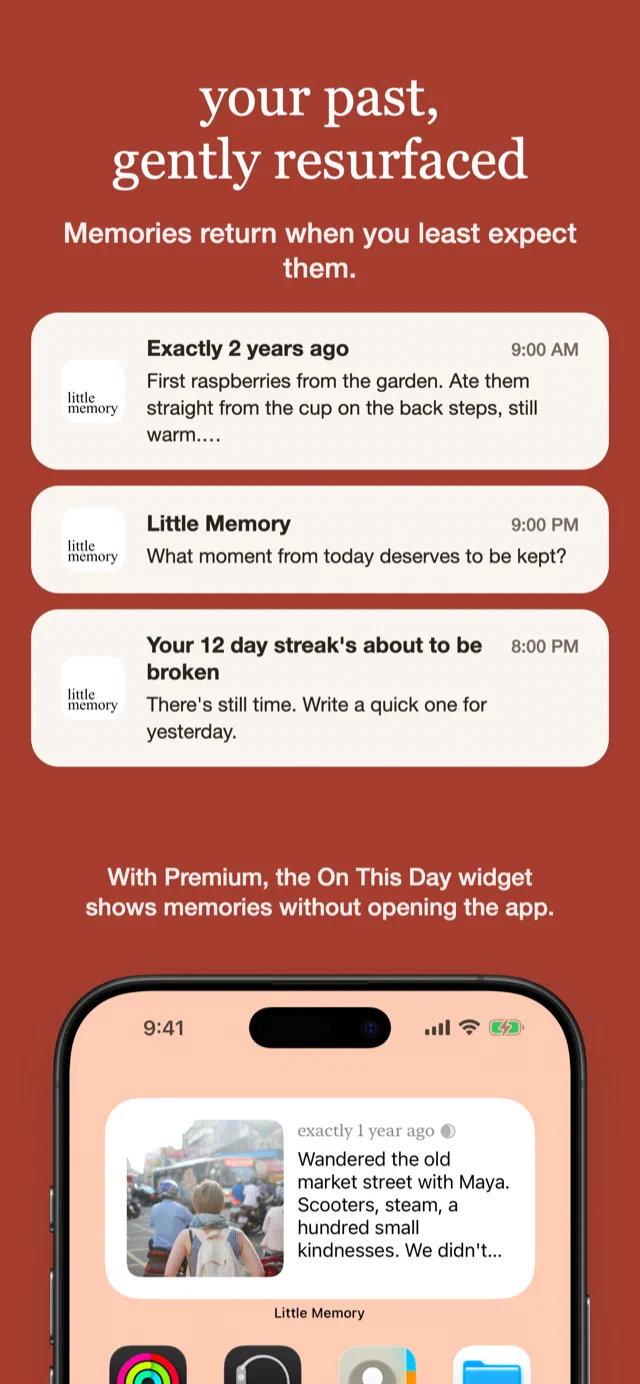
Little Memory 2.0 showing a memory from exactly one year ago Writing a one-sentence memory in Little Memory 2.0

What the first testers found

  • In the first batch of testers, 4 longtime users imported thousands of memories, and the world didn’t crash and burn, yay!
  • Lilmem previously had a way to write memories via SMS. Twilio sent a webhook request to us when these would arrive, and, for longer messages that were over 160 characters, I would get 2+ requests. However, they wouldn’t always come in chronological order. Moreover, they didn’t have a single message ID to let me know they were a single message. Because of a bug in the backend, this ended up letting some users have multiple entries on a single day (oi!). I cleaned this up in the import into the app, but it did cause some issues for some folks who did their initial imports into the app.
  • Some users really enjoy writing on their desktop before bed, and being able to add memories only from the iOS app was a problem. I didn’t want to end up back in a place where I was storing entries in my DB again, but I did figure something out: Drafts. Drafts lets Premium users write a memory from the web for the day, and when the iOS app is launched, it fetches the unsaved drafts and reconciles them so they end up living in the app.
  • There were some users reporting that they didn’t see photos on days where they were sure they had photos saved. There was a concurrency issue where even though a photo would get downloaded, it wouldn’t get properly attached to a memory. After a good amount of logging and tracking this down, I got a build for testers that included a repair pass to get their photos back.
  • So glad I did a few rounds of testing on TestFlight. These would have been super expensive things to handle after release.

Get off my lawn! And servers!

I’ve generally felt uncomfortable storing people’s memories on my own servers. What if I got hit by a bus today? Someone would have to make sure the servers keep running so folks could keep reading and writing in their personal private journals. That’s definitely not something I’d want for myself or for Lil’memmers.

Not only that, but now that all your memories live on your phone, you can read/write offline, even without internet access. And it opens up the door for some exciting new features. I can’t wait to get 2.0 into people’s hands and start iterating on the app with some ideas I’ve had queued up for years.

On AI, privacy, and your diary

A diary is about the most personal data an app can hold, and every app holding it is one breach, acquisition, or bad decision away from leaking that extremely sensitive and private data. With AI becoming more and more capable every day, the possibility of servers getting hacked grows. I’ve never used any Little Memory data for AI training, but even the possibility that your data could be read or used for training is something I would rather avoid.

With Little Memory 2.0, the iPhone app is offline-first. Memories are written and stored on the phone, you can keep a diary without an account, and your private and personal data stays in your control and in your phone rather than in the cloud.

What’s new?

  • Your memories are imported into your iPhone
  • All your memories are now synced across your devices with iCloud
  • You can now add/edit memories even when offline (yay!)
  • A ground-up redesign of the whole app
  • The app is now free to download, and if you already paid for it, you keep Premium
  • After you update and import your memories, you’ll no longer get email reminders
  • If you want to write from the web or from your desktop, after importing to the app, you can still visit the website and write an entry for Today with Drafts (Premium feature)
  • There’s a new Photo Recap feature that lets you view photos for a day alongside your memory for that day
  • Still here: charts, reminders, streaks, Dropbox backups, export
  • Little Memory supports Dark Mode now, woo-hoo!
Little Memory 2.0 stats: streaks, people, and places from your year Little Memory 2.0 charts of the people and feelings in your entries

The blast from the past is back again

Little Memory 2.0 is now live in the App Store with all the latest updates.

Longtime users: Your memories are ready to come home to your iPhone. Download the new app and import them to your device so you can read and write without needing to be online.

New users: Welcome! Write one sentence about your day in less than 15 seconds, and start seeing your memories come back to you.

I’m excited to share Little Memory 2.0 with you. It’s been a joy getting it ready for users, and I’ve been wanting to get it into people’s hands to make the meaningful experience of reflection and journaling even easier and more enjoyable.

I think you’re going to really like the new app, and please reach out if you have any feedback or find any issues.

/software-development /little-memory #ios-development

Action Runner iOS Architecture

Around mid-2021, I’d started developing SwiftUI apps in a new way. I’d previously considered architectures like MVC, MVVM, VIPER, etc and many of them never felt right. I often found myself spending time considering where to put business logic. With SwiftUI, it wasn’t entirely clear where data-level changes should be taking place.

Controllers?

Most (or any?) business logic certainly shouldn’t be living in the views, but should I be building controllers to manage data? When I did that, I ended up struggling to define the boundaries of each controller. Dependencies would start to get messy, and I’d start getting circular dependencies across controllers that called each other. Controllers would start to get really big, especially for authentication, and I’d often struggle to quickly find code I was looking for.

What’s an Action?

In my work using React, the one-way data flow in Redux and how it handled actions was an idea that came to mind to try to tame these large controllers I was noticing in my projects. I started with adding a simple struct in Swift that would work like an action that a view or another action could call:

struct LoginAction {
    let email: String
    let password: String

    func execute() async throws {
        // ...
    }
}

With a call site like:

let action = LoginAction(email: "...", password: "...")
try await action.execute()

I essentially pulled out each function from my controllers and now had them each as their own structure.

Having a dedicated struct for each action gave me some nice things:

  • I can create helper functions for the main execute() without exposing them to other actions, whereas if this were all part of a controller it would be less isolated
  • If I wanted to expose that helper function to other actions, I could do so with its own dedicated Action
  • I could write unit tests for that specific action without needing to worry about dependencies that a full controller might carry
  • Chaining Actions could be done within an execute like: otherAction.execute() (this gets even cooler later when we pass through RunContext)

What about dependencies? In the case of this LoginAction, I’d have to bring in some sort of API to actually make an HTTP request and execute that request.

Enter ActionRunner and RunContext

struct ActionRunner: Sendable {
    let runContext: RunContext

    func run<A: RunnableAction>(_ action: A) async throws -> A.Output {
        try await action.execute(in: runContext)
    }
}

protocol RunnableAction: Sendable {
    associatedtype Output
    func execute(in context: RunContext) async throws -> Output
}

struct RunContext: Sendable {
    let services: ApiServices
}

And then we update LoginAction to:

struct LoginAction: RunnableAction {
    let email: String
    let password: String

    func execute(in context: RunContext) async throws -> LoginResult {
        let service = context.services.account
        let response = try await service.login(email: email, password: password)
        // ...
    }
}

An ActionRunner can be added to SwiftUI’s EnvironmentValues to make them easy to get from your views:

struct LoginView: View {
    @Environment(\.actionRunner) private var runner
    // ...

    private func login() async {
        do {
            let loginAction = LoginAction(email: "...", password: "...")
            self.loginResult = try await runner.run(loginAction)
        } catch {
            // ...
        }
    }
}

And this is how chaining would look now:

struct LoginAction: RunnableAction {
    func execute(in context: RunContext) async throws -> LoginResult {
        let service = context.services.account
        let response = try await service.login(email: email, password: password)

        let storeTokenAction = StoreTokenAction(token: response.token)
        try await storeTokenAction.execute(in: context)

        // ...
    }
}

Analytics

I ended up adding a helper function as an extension to RunnableAction:

extension RunnableAction {
    func withAnalytics<Result>(_ event: AnalyticsEvent, _ perform: () async throws -> Result) async rethrows -> Result {
        // ...
    }
}

So we can call it in our Actions thusly:

struct LoginAction: RunnableAction {
    let email: String
    let password: String

    func execute(in context: RunContext) async throws -> LoginResult {
        let service = context.services.account
        return try await withAnalytics(.login) {
            let response = try await service.login(email: email, password: password)
            // ...
        }
    }
}

Action Runners

I’ve been calling this the Action Runner Architecture. It’s served me well across multiple projects in offline-first apps, CoreData apps, API driven apps, and App Clips. I’ve codified it into its own package, and I continue to use it in my projects today.

There are still issues that are not yet fully addressed here:

  • Infinite recursion can happen with what we have now
  • We need to define an ActionRunner for testing so that dependencies are stubbed in a testing RunContext
  • I group related Actions in a single file, but I still need make decisions on where things go

Who else has done this?

I found it interesting that Whatnot, in 2022, came up with a similar pattern that they show in their blog post: Reacting to Native: How we rebuilt a unicorn iOS app in 4 months.

Their example of their BookmarkLivestreamAction smells very similar to what I’ve done with my own pattern:

class BookmarkLivestreamAction {
    // ...

    func run(completion: @escaping FollowLivetreamRequestCompletionHandler) {
       /// ...
    }
}

A more modern implementation would likely use Swift’s structured concurrency rather than the escaped closure, and I prefer to make sure my actions don’t hold state, so mine are always structs.

/software-development #ios-development

Shopify is moving from React Native to native Swift/Kotlin

Native is now the future of mobile at Shopify (via):

Native still means building and maintaining software on two platforms, that cost has not disappeared. What changed is that agents can now do enough of the implementation, translation, testing, and review work that it’s no longer the deciding factor it was in 2020.

React Native apps can be fast. Ours are. We are making this change because agents have reduced the advantages of sharing implementation, while the advantages of building for each platform remain. Native keeps us closer to platform capabilities and first-party tooling, with fewer framework and dependency layers between our code and the platform.

I’ve noted before that React Native can make more sense for larger teams that have more bandwidth for more testers and have expertise in React/JS tooling as well as native code/tooling, which helps manage the “write once, debug everywhere” problem. With smaller teams, I find that it’s harder to manage, as code changes can easily scatter bugs across platforms. And with React Native, you still need platform expertise, but now you need both native expertise and React Native expertise.

From their engineering blog, it also looks like they were bumping into issues managing code re-use between the React Native and native layers:

For the Shop App, this coincided with our next major React Native investment: adopting the New Architecture. That work would have required us to revisit native module integrations, rendering, and the boundaries between shared and platform-specific code.

I imagine some of the code re-use complications come from trying to build native widgets, extensions (looking at you, Notifcation Service Extension), and things like App Clips. It’s already complicated enough to manage and architect modules and shared code for a single platform (with varying platform versions too!): now think about having to consider how to do it across multiple platforms!

/software-development #ios-development #ai

First use of Frontier Model

I was curious when the first use of the term “frontier model” came about and who coined it. It looks like it was originally defined in a joint research paper in July 2003: Frontier AI Regulation: Managing Emerging Risks to Public Safety:

For the purposes of this paper, we define “frontier AI models” as highly capable foundation models that could exhibit sufficiently dangerous capabilities. Such harms could take the form of significant physical harm or the disruption of key societal functions on a global scale, resulting from intentional misuse or accident. It would be prudent to assume that next-generation foundation models could possess advanced enough capabilities to qualify as frontier AI models, given both the difficulty of predicting when sufficiently dangerous capabilities will arise and the already significant capabilities of today’s models.

Though it is not clear where the line for “sufficiently dangerous capabilities” should be drawn, examples could include:

  • Allowing a non-expert to design and synthesize new biological or chemical weapons.
  • Producing and propagating highly persuasive, individually tailored, multi-modal disinformation with minimal user instruction.
  • Harnessing unprecedented offensive cyber capabilities that could cause catastrophic harm.
  • Evading human control through means of deception and obfuscation.

This list represents just a few salient possibilities; the possible future capabilities of frontier AI models remains an important area of inquiry.

By this, it seems like frontier models are by definition considered to be dangerous or maybe more accurately that they have the potential to be dangerous:

Our definition focuses on models that could — rather than just those that do — possess dangerous capabilities, as many of the practices we propose apply before it is known that a model has dangerous capabilities.

/software-development #ai

Anime Repertoire 2003

Here lies my old anime watched list that I used to update whenever I’d watch any episode of anime.

Looks like I stopped mid-2003, when I’d landed in Kyoto for my study abroad. I’ve since finished some series and started others, so this is kind of my little anime snapshot in time.


Repertoire [by date]:

  1. Robotech
  2. Macross: Do You Remember Love?
  3. Macross II
  4. Gundam 0080: War in the Pocket
  5. Akira
  6. Ghost in the Shell
  7. 3x3 Eyes [09.23.2001]
  8. Tenchi Movie: Tenchi Muyo in Love
  9. Slam Dunk [undone]
  10. Macross Plus
  11. Macross 7
  12. Neon Genesis: Evangelion
  13. Tenku no Escaflowne
  14. Flame of Recca
  15. Hakkenden
  16. Gundam W [undone]
  17. Gundam 0083
  18. Evangelion: Death/Rebirth
  19. Evangelion: End of Eva
  20. Gundam 0093: Char’s Counterattack
  21. Tenchi in Tokyo
  22. Grave of the Fireflies
  23. Princess Mononoke
  24. Nadesico: The Prince of Darkness
  25. On Your Mark
  26. Sakura Diaries [undone: 4]
  27. Initial-D: First Stage
  28. Serial Experiments Lain
  29. Ruroni Kenshin OAV
  30. FLCL
  31. Dual: Parallel Trouble Adventure
  32. Gundam 08th MS Team
  33. Tenchi Movie 2: The Daughter of Darkness
  34. Gundam X [08.15.2001]
  35. Giant Robo [undone]
  36. Nadesico
  37. Slayers [07.25.01]
  38. DiGi Charat
  39. Trigun
  40. Ah! Megumi-sama
  41. The Royal Space Force–Wings of Honneamise
  42. Kiki’s Delivery Service
  43. My Neighbor, Totoro
  44. Ponpoko
  45. To Heart [undone]
  46. Otaku no Video
  47. Initial-D: Second Stage
  48. Marmalade Boy [08.02.2001]
  49. Vandread
  50. Love Hina
  51. eX-Driver [undone]
  52. Kazemakase Tsukikage Ran [undone: 9]
  53. Inu Yasha [undone: 10]
  54. Kaikan Phrase [undone]
  55. Amazing Nurse Nanako [undone: 3]
  56. Boys Be… [undone: 7]
  57. Love Hina: Christmas Special
  58. Initial-D: Extra Stage
  59. DiGi Charat: Christmas Special
  60. Kareshi Kanojo No Jijou
  61. Perfect Blue
  62. Ah! Megumi-sama Movie
  63. Initial-D: Third Stage [Movie]
  64. Noir [undone: 13]
  65. Excel Saga [undone: 10]
  66. Slayers Next [undone: 25]
  67. Card Captor Sakura [undone: 16]
  68. Mobile Suit Gundam [undone: 37]
  69. Marmalade Boy Movie [08.02.2001]
  70. Gun Buster [08.03.2001]
  71. DiGi Charat: Summer 2000 Special
  72. NieA_7 [undone: 2]
  73. Love Hina Spring Special [09.16.2001]
  74. Love Hina ep25 [09.16.2001]
  75. Spriggan [09.16.2001]
  76. Magnetic Rose [09.17.2001]
  77. Momoiro Sisters [undone: 1]
  78. EDENs BOwY [undone: 1]
  79. Magic Knights Rayearth [09.20.2001]
  80. Cowboy Bebop [undone: 10]
  81. Fushigi Yuugi [10.05.2001]
  82. Rurouni Kenshin [undone]
  83. Read Or Die [undone: 1]
  84. Steel Angel Kurumi 2 [undone: 2]
  85. Fushigi Yuugi OAV1 [10.06.2001]
  86. Fruits Basket [undone: 2]
  87. Kodomo no Omacha [undone: 2]
  88. Metropolis [01.25.2002]
  89. Gatekeepers [undone: 5]
  90. Blood [02.15.2002]
  91. Barefoot Gen [03.21.2002]
  92. Hellsing [undone: 1]
  93. Steel Angel Kurumi [undone: 1]
  94. Arjuna [undone: 1]
  95. Onegai Sensei [07.14.2002]
  96. Najika Dengeki Sakusen [undone: 4]
  97. Iketeru Futari [undone: 7]
  98. Colorful [04.12.2003]

/japan #anime #reflection #retro

Cory Doctorow:

If you showed up at Defcon and gave talk about how your autonomous malware did something unexpected and damaged someone else’s computers, the first question from the audience would be “Why are you so shit at making secure sandboxes?” It wouldn’t be “How are you so awesome at making hacking tools?”

#ai

Pry it from my warm live feet

America is built for driving. There’s hidden demand for something better.

44 percent of Americans — approaching half the country! — would rather live where homes are “smaller and closer to each other, but schools, stores and restaurants are within walking distance.”

That’s a lot more than I expected. But I wonder how that’s split between more rural and urban folks.

The National Association of Realtors (NAR), using a sample of 2,000 adults in the 50 largest US metro areas, 59 percent said they prefer “houses with small yards, and it is easy to walk to the places you need to go.” The remaining 41 percent would choose “houses with large yards, and you have to drive to the places where you need to go.”

I definitely am of the camp of wanting our lives to be more walkable. It gives us more opportunities to interact with one another and more chances to feel like a part of a community. Also, it doesn’t cost anything! (looks at gas prices at $6.29/gal right now)

John Gruber did a recent “1yr later” (or maybe a “where are they now”?) review of the iPhone Air and iPhone 17 Pro. I’ve gotta chime in with my experience with the 17 Pro. I’ve been on the iPhone Upgrade Program for years, and every year, after around the 1st week, I start noticing scratches build up on my screen. This time, that didn’t happen. And now, nearly 1yr into using the same phone: still no scratches. For me, this has been the most noticeable and worthwhile difference upgrading from the 16 Pro.

#apple

Rewarding the user for wondering and trying

Ivory’s account switching:

There is also something great in seeing an interface that grows with you, or one where you can say “I wonder if…” based on your prior interactions and expectations, and the interface actually rewarding you for that thought.

I can get pretty strict about the use of terms, symbols, and gestures in an app. This kind of discovery of features is what that kind of strictness and consistency allows for. I see it very similar to game design, where you teach the user the rules of your interactions and visual vocabulary, and once they’re in that world they know what to expect.

/software-development #design #ios-development

マグロいかがでございますか

Hakodate Ichiba in Kyoto Diamond City Gojo

When I studied in Kyoto, I took a part time job at a chain sushi boat restaurant, Hakodate Ichiba (すし処 函館). My Japanese was good enough at the time such that they let me stand in front of the house and make nigiri sushi and yell out “いらっしゃいませ” and “マグロいかがでございますか?”

As part of my training, I practiced hand pressing rice for nigiri. I had to make 100 and 80 of them had to be within spec before they would allow me to start making nigiri for actual customers. Each one had to weigh 12.5g (+/- 0.5g) and my manager would check that the rice would not be pressed too hard (like mochi) or too loosely (it would fall apart). It took me a week for me to pass and start getting items onto the belt.

I’ll occasionally have a sushi party at home or at a friend’s place and get a chance to use these old skills again. The trickier bit for me is not knowing how to cut the fish, since that was done for me by other folks. But at least I’ve got my own tricks for making yummy sushi rice now.

/japan #food

Tab dump

Inspired by Kottke’s recent Emptying the Tabs, here’s my own dump from my own digital hoarding:

Understanding the Apple ][. Because, y’know… I might need to reference this later.

Douglas Adams on the English–American cultural divide over “heroes”:

You cannot make jokes about failure in the States. It’s like cancer, it just isn’t funny at any level. In England, though, for some reason it’s the thing we love most. So Arthur may not seem like much of a hero to Americans – he doesn’t have any stock options, he doesn’t have anything to exchange high fives about round the water-cooler. But to the English, he is a hero. Terrible things happen to him, he complains about it a bit quite articulately, so we can really feel it along with him - then calms down and has a cup of tea. My kind of guy!

Ah, good ol’ Arthur Dent. He was my kind of hero when I was growing up. Also, I’d love to give Blackbooks a good re-watch sometime.

Japan’s Dodo Land. A place to be annoyed, for those of us who love to be annoyed.

How Money Works. It leaves your wallet? What else do you need to know?

Inner Drumming. I’ve yet to have a chance to learn drumming, but this sounds like my kind of learning.

Why the open social web matters now. I mean, the Internet seems to be in decay, so maybe this posting on my blog is all for naught?

Adaptive Mixtures of Local Experts. Some light reading for when you want to dive in to how a Mixture of Experts (MoE) LLM model works, straight from the source. Been wrapping my head around MoE’s vs dense models.

Why did AMD just buy this REALLY WEIRD chip company? YouTube video discussing the acquisition of Taalas by AMD. Smells like positioning for local AI, and has hints of what folks were doing for making ASICs for crypto mining.

Why your local LLM feels dumber than it is.

Remote for OpenCode. Looks promising, and fancy way to handshake via iCloud, but doesn’t seem like it works yet outside of the local network. Maybe Tailscale is the right way forward?

Aging Brains Blend Memories Together Instead of Just Forgetting Them, Study Finds. Our context is just filled up, alright. Need to compact.

There’s more than this, but that’s it for now. I can least feel like I can close these tabs and come back to this list if I need to come back to them. Thank you for your attention to this matter.

/japan #local-ai #music #ai #apple #memory

Ready Time 3.6: Routines and App Clips

Now it’s faster and easier to add a new plan on Ready Time. With Ready Time 3.6, you can now select from 46 pre-defined routines to start your plan, including:

  • Morning routine. Getting up can be tricky for some of us, and having a regular routine definitely helps out.
  • Doctor appointment. You scheduled it, so you gotta make sure you get out the door and to the doctor’s office in time.
  • Concert night. Don’t wanna miss the headliner!

And now, for folks who are discovering Ready Time from the web, if you visit a routine page from Safari on iOS, you can start an App Clip right from the page to quickly start planning for a deadline without even needing to install the full app! Just open a routine page like Getting out of bed and open the App Clip right from Safari.


Screenshot of the Ready Time App Clip flow

The App Clip lets you get notifications for each step in your plan, just like the full app. And when you’re ready to create more plans or customize your plans more, you can quickly download the full Ready Time app.

We hope these updates will make using and trying out Ready Time faster and easier.

Let me know if you have any feedback. I love to hear from you.

/ready-time #ios-development #nerdtower

When I hear about agents using public forums to help them save memories and coordinate information: I think of the movie Memento where he tattoos himself as reminders of important things.

#ai #memory

Interesting. An engineering manager starts to build software again: it’s more fun than managing people. Everyone at the company is trying out new ideas constantly. It’s Lord of the Flies.

/software-development #ai

Heard this question recently:

What’s your “no email” job?

Meaning: the job you would want to take where the job wouldn’t involve email. Their answer was: HVAC.

Mine would be: Falconry.

All Thoughts »